
Not receiving verification emails?
DfE Sign-in has multi-factor authentication which enhances account security for all users.
When you enter your sign-in details, you will be sent an authentication code to your email. You must enter the code on the sign-in screen to complete authentication and access your account.
If you’re not receiving verifications emails, firstly check if your email is up to date. If you need to update your email address, please raise a request through the contact us form.
Carry out the steps below if you are still not receiving your verification code:
Check your email spam / junk folders.
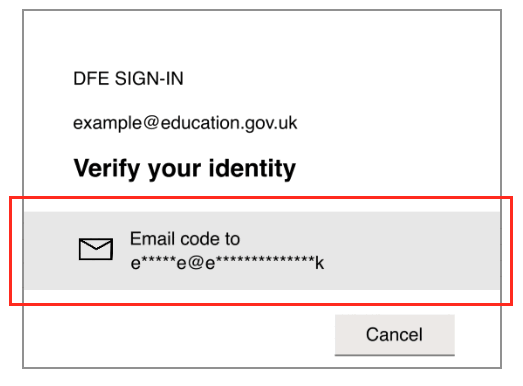
Make sure you click the email code button, as the verification code is not sent automatically. After logging in, you will see the screen where you need to click the grey box that displays your email address. In the image below, this area is highlighted in red for illustration.
Check with your I.T. team that emails from the account-security-noreply@accountprotection.microsoft.com are not being blocked by your domain.
If you’re still not receiving the verification codes after carrying out the above steps please reach out to our support team through our contact us form.
Last updated: 25 November 2025